Topic outline
Create a new course
- Log in with your administrator account
- From the left panel (the Navigation drawer) click Site administration
- Click the Courses tab
- Click Add a new course
- Add your course details, using the icon
 for extra help
 - Click Save and display
- Click Proceed to course content to add your teaching materials.
Upload an Existing Course
- Make sure the course you want to upload (known as a "course backup") has the file ending .mbz.
- Log in with your administrator account
- From the left panel (the Navigation drawer) click Site administration
- Click the Courses tab
- Click Restore course
- Drag in or upload your .mbz file into the space Import a backup file
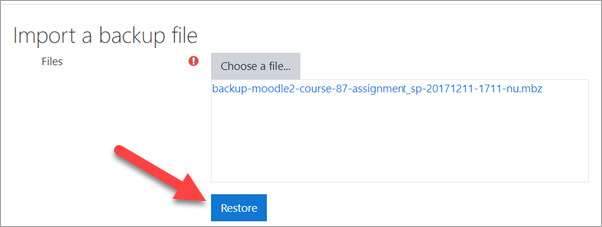
7.Click "Restore" and on the next page, scroll down and click Continue
8.In the "Restore as a new course" section, click the button next to "Miscellaneous" OR click the button of the category where you want to upload your course and then press Continue
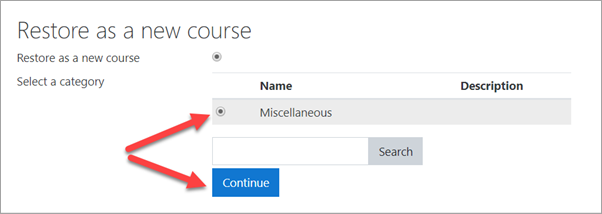
9.Click the Next button at the bottom of the next two pages
10.Click Restore on the final page. Your course will then be displayed.
Acknowledgment
Upon acknowledging completion of this course, you will receive a certificate of completion. Please keep a copy for your records.


